Inventor wins the UK Apprentice!!

Congratulations goes out to Tom.

It’s fantastic that an inventor was backed by Sir Alan, rather than the ‘bland suits’ that he was up against.

What we really need now is for more corporations (especially UK ones) to see the light and progress real visionary people within their organisation, rather than people who just ‘talk a good game’.
Microsoft Surface within a Collaborative Virtual World

Attended a fantastic demonstration on Friday in a virtual world from the guys at VastPark.

Once in the world I was shown a seat at a microsoft style surface table, where Bruce Joy and Tim Glew from VastPark proceeded to introduce office documents, websites and other media onto the table.

I could take hold of each object, re-size and display each object full screen, whilst we all continued chatting via VOIP in the virtual world.

A fantastic piece of collaboration and I’m looking forward to seeing more from these guys.

Collaborative Virtual Worlds

In some of my spare time I’m researching the use of virtual worlds in business and learning.
Currently I am evaluating a tool called Vast Park which is a virtual world platform with lots of collaborative features that allow disparate colleagues to meet and share/edit documents from within a virtual environment.
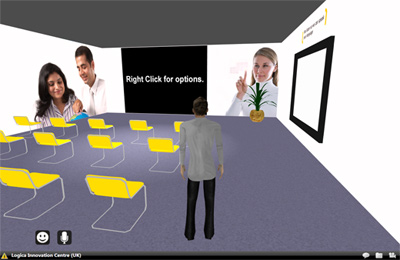
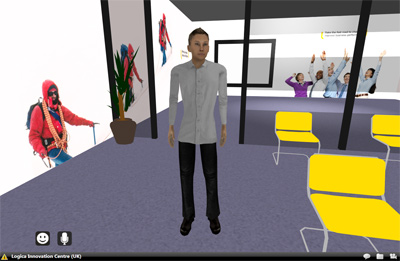
In the images below you can see me in my first Vast Park virtual world, which I’ve created to be a replica of the Innovation Room in London that the company I work for use to present to clients. In this virtual world I can meet/greet and collaboratively edit office documents or just do a powerpoint or video presentation for people wherever they may be in the world.
Virtual World Sample 1

Virtual World Sample 1

Virtual World Sample 2

Virtual World Sample 2

Vast Park is .net based and developers can add there only .net extensions, so soon I’m hoping to add extra in-world features.

Mobile learning that co-exists with your desktop curriculum

I’m currently in the latter stages developing a series of apps that allow a student to view content from a moodle-based LMS. I know, not knew, but I’ve also modified our moodle database so that for every desktop resource, there are equivalent smartphone/tablet courses available.

Therefore, if a person views our Moodle LMS from their desktop, they get the ‘standard’ desktop course, yet if they access from their iPad/iPhone, they get a differing version tailored for that device.

Other features, such as chat/forums/quizes are then handled on the apps as well to provide a socially rich experience.

I’m very interested on people’s views as to whether my splitting of courseware in this fashion is a good idea, or whether you’ve tried and succeeded in having e-learning that displays well on every device.